03 / 04Android · Audio tool

A portable sound console for creating immersive tabletop experiences.

An Android soundboard for tabletop role-playing, narration, and gaming sessions, with music, ambience, and effects controlled from one device.

Product in development
Android · Audio toolEchoQuest

Product in development

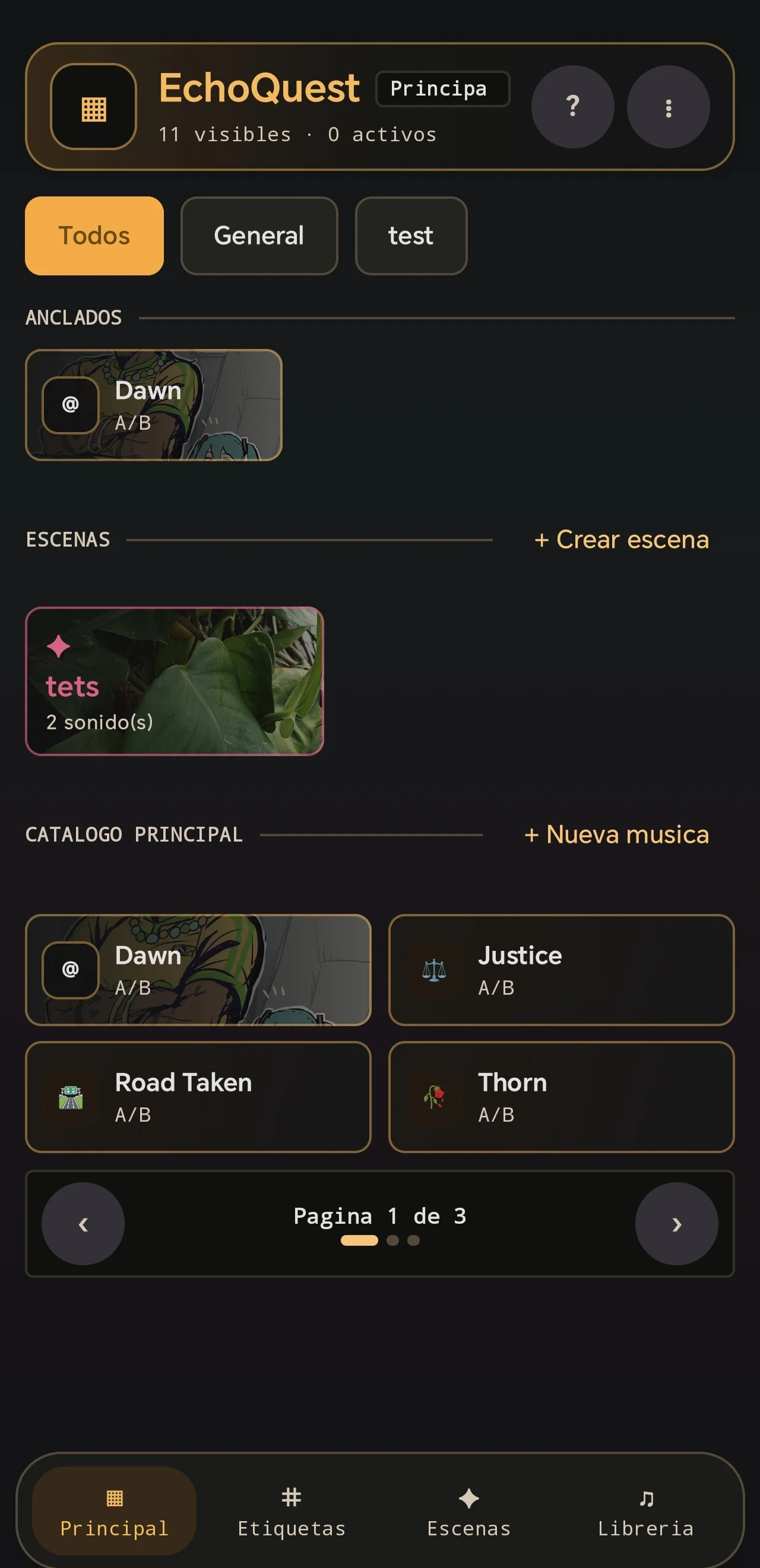
Soundboard home. Pinned sounds, scenes, and the main catalog stay within reach for quick use during a tabletop session.
01Soundboard home
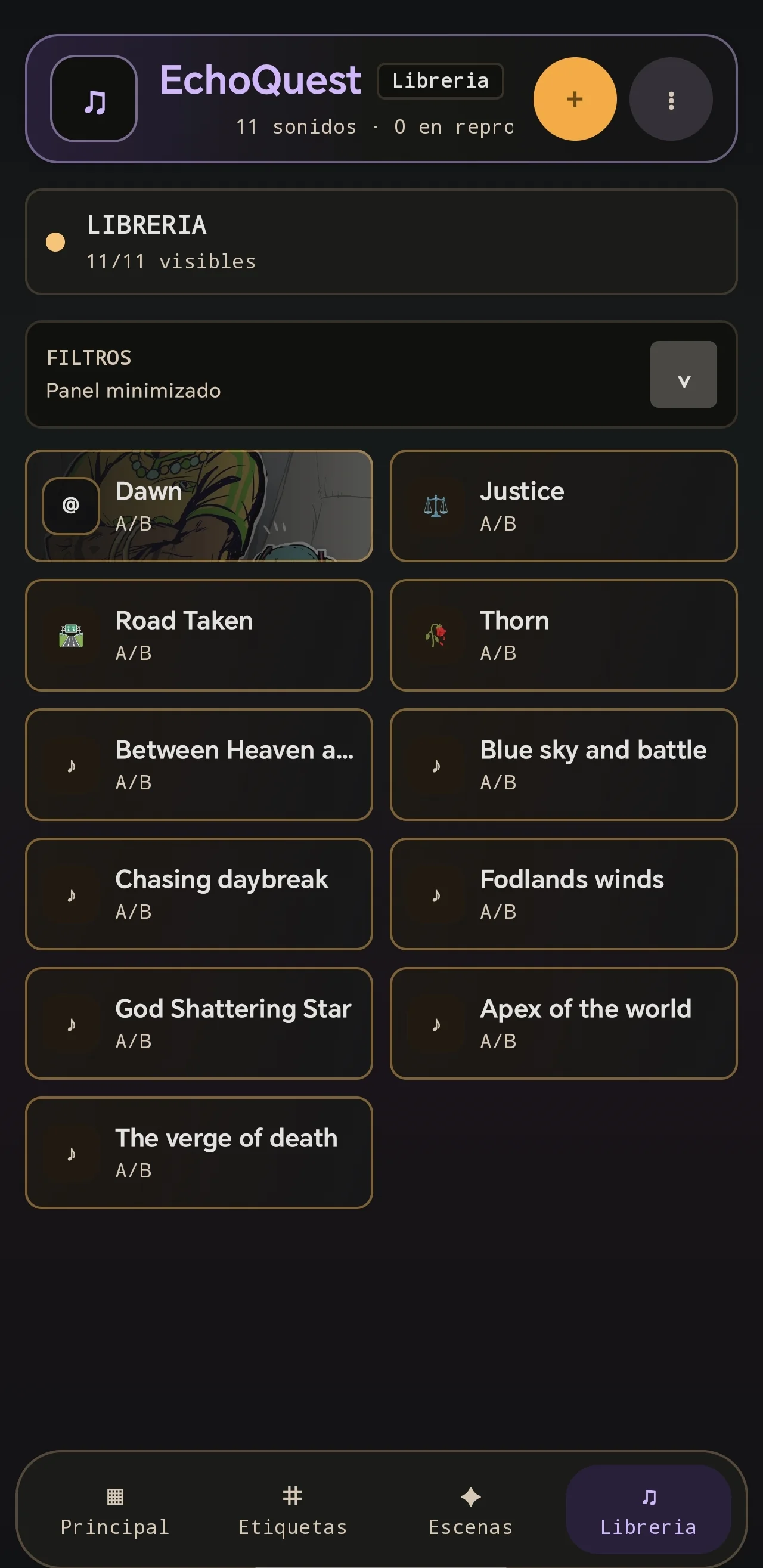
Audio library. The library presents local tracks as large, legible controls designed for recognition during live play.
02Audio library
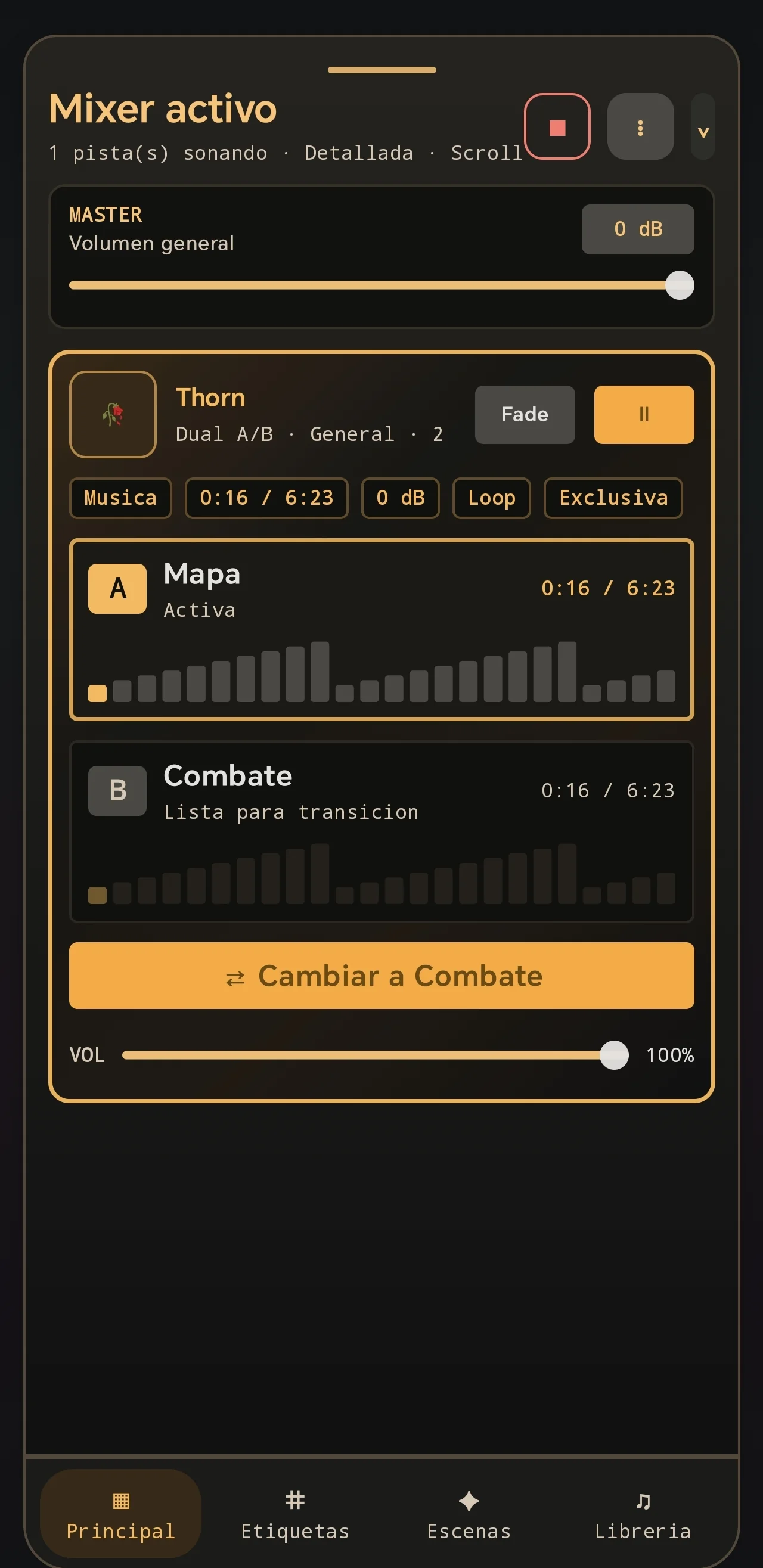
Active A/B mixer. The detailed mixer exposes master volume, track progress, fade, looping, and a prepared A/B transition.
03Active A/B mixer
PLATFORMAndroid
MY ROLEProduct Design · UX/UI · Android Development
TYPEPersonal project
TECHNOLOGIESKotlin · Jetpack Compose · Material 3 · MediaPlayer
VALIDATIONUser testing
01

The context

Audio can completely change a tabletop role-playing session. A quiet forest, distant thunder, tavern music, or a sudden combat track can make a scene significantly more immersive.

Managing that audio can also become distracting. A game master may need to search through folders, switch applications, manage tracks, and adjust volumes while simultaneously running the game.

02

The challenge

The application needed to support much more than pressing a button. Several audio layers may be active at once, and a transition to combat should not abruptly stop the ambience or interrupt the session.

How might we give game masters powerful audio controls without making them manage a complex interface during the game?
Rain + fireplace + tavern ambience + background music → Combat transition → Return to the previous atmosphere
03

Designing for in-session use

EchoQuest assumes that the user’s attention belongs primarily to the game. Common actions therefore require as few interactions as possible.

Sounds become reusable buttons classified as music, ambience, or effects. Looping, timers, volume, and fades can be configured without rebuilding the setup every session.

  • Music
  • Ambience
  • Sound effects
04

Information architecture

The structure separates using audio during a session from managing the collection outside of one.

Main

Quick access to the sounds and controls most useful during a session.

Tags

Flexible labels for grouping and finding sounds.

Scenes

Reusable atmospheric setups that combine multiple sounds.

Library

The complete audio collection and its organization.

05

Scenes

Scenes became one of the product’s most important features. Instead of activating several sounds manually, users can group them into a reusable atmosphere.

Haunted Forest

  • Wind
  • Distant crows
  • Forest ambience
  • Suspense music
06

Dual Music A/B

Exploration may suddenly become combat. Stopping one song and manually starting another creates an awkward interruption.

Dual A/B music lets users prepare two states and transition between them with fade-in and fade-out behavior, keeping the change inside the atmosphere rather than making it feel like operating a media player.

Exploration ⇄ Combat
07

Managing multiple sounds

A dedicated mixer shows everything currently playing, so users do not need to return to the original sound button to change an active track.

  • Individual volume
  • Playback position
  • Pause and resume
  • Transitions
  • Individual tracks
  • Master volume
08

Designing for offline use

EchoQuest does not require an account, server, or Internet connection. Users select audio directly from their Android device, and the application stores its setup and preferences locally.

This was a product decision as much as a technical one: a soundboard should not stop working because a venue has poor Wi-Fi or a remote service is unavailable.

09

Technical implementation

EchoQuest is a native Android application written in Kotlin with Jetpack Compose and Material 3. Playback uses Android’s MediaPlayer API.

Selected files remain on the device, while persistent URI permissions allow the application to maintain access and build a personal sound library without cloud infrastructure.

10

Validation

I tested how quickly users could control a session’s atmosphere without losing focus on the game itself.

  • Add an audio file and create a sound button
  • Start several ambience tracks
  • Adjust individual volumes
  • Switch musical states
  • Activate a scene
  • Find an existing sound
  • Understand what is currently playing
11

The final experience

EchoQuest combines the speed of a soundboard with the control of a lightweight mixer. Users can build a library, organize sounds, create scenes, play simultaneous ambience, switch musical states, and manage active playback from one interface.

The game master can prepare an atmosphere beforehand and control it with only a few interactions during the session.

WHAT I LEARNED

Lessons from
the process.

01

Interaction speed matters when the app is secondary

The tool is important, but it should never become the user’s main focus during a session.

02

Powerful tools need progressive complexity

Advanced scenes and mixing are valuable while basic playback still needs to remain simple.

03

Architecture can support the product promise

Keeping the app local and offline directly supports reliability during real games.

04

State management becomes part of UX

When several sounds play simultaneously, understanding the system’s current state becomes a design problem.